Aug 1, 2026
Introducing Symphonia: Keep the Agent in Focus
I built a native macOS workspace for coding agents around one idea: supporting tools should come forward when needed without rearranging the place where your attention already lives.
- AI
- Developer Tools
- macOS
- Open Source
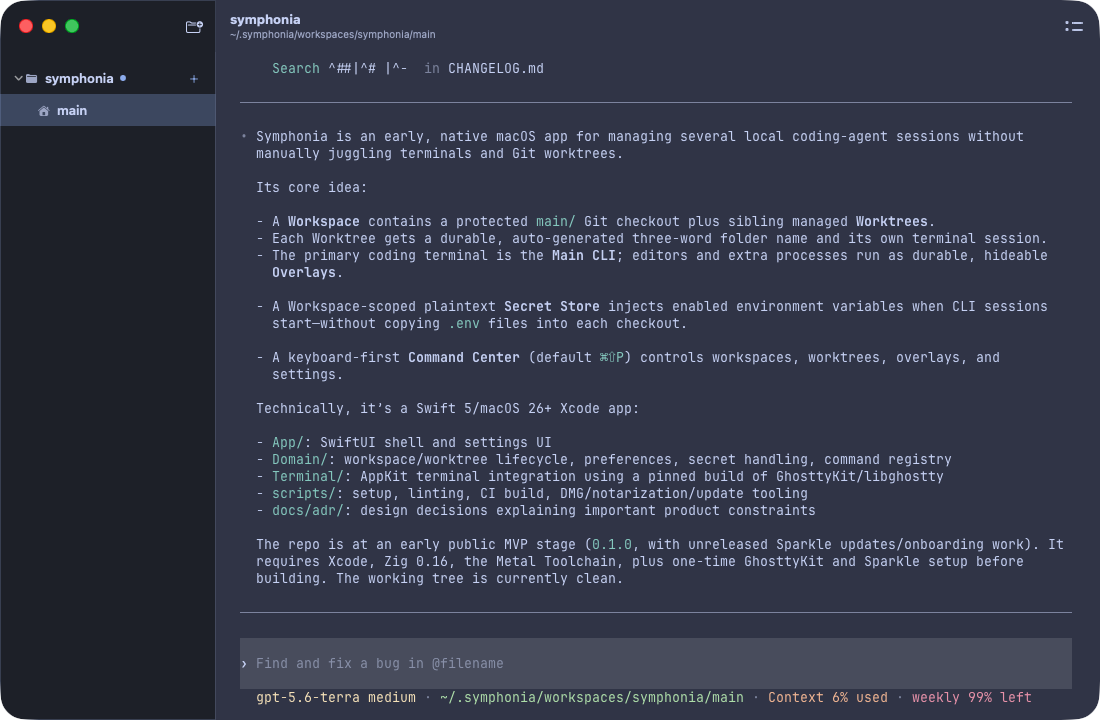
Today I am releasing Symphonia, an open source macOS app for managing local coding agents.
The short description is that Symphonia gives coding agents real terminals, isolated Git worktrees, and a keyboard-driven way to move between them. But those features are not the reason I built it.
I built Symphonia because I wanted my tools to stop moving my attention.
The problem was not a lack of tabs
My usual coding session starts with a conversation. I create a worktree, open a coding agent such as Codex or Claude Code, and work with it on one task. That conversation is the main activity. It is the place I keep returning to and the place where the context of the work develops.
Of course, one terminal is rarely the only tool I need. I may need another shell for a server, a Git command, or a quick inspection. I may want to open an editor or a file manager. Most developer tools solve this by adding tabs, panes, or panels.
That works, but it changes the hierarchy of the screen.
In a terminal app, every new activity becomes another tab I have to identify and remember. In a GUI editor, opening a terminal often pushes or shrinks the conversation that already had my attention. The content moves, the dimensions change, and the primary task becomes one surface among several competing surfaces.
That small movement bothers me more than I expected. My mind is already anchored to the conversation. When the layout changes, I briefly lose track of what was important.
I did not want another way to arrange more things on screen. I wanted one thing to remain primary.
One main surface, everything else on demand
Symphonia starts with a simple hierarchy: the coding agent lives in the Main CLI, and supporting tools stay out of sight until I ask for them.
When I need another terminal, I open it as an Overlay. It appears above the Main CLI without resizing or replacing it. I can run a server, inspect the repository, or use another terminal UI, then hide the Overlay and continue the agent conversation exactly where I left it.
Hiding an Overlay does not stop it. The process remains alive. I can open the Overlay Switcher later, choose the activity I need, and bring it back. Symphonia also tracks external activities such as GUI editors and file managers through Glance, its Activity Manager.
The difference sounds small, but it changes how the workspace feels. Secondary tools are available without being permanently visible. They come to my attention when needed, then leave without rearranging the place where my attention lives.
This is the interaction experiment at the center of Symphonia. Most tools are exploring better sidebars, tabs, and panes. I wanted to see what happens when the default is one focused surface and everything else is temporary.
Worktrees should feel like sessions, not chores
The interface only works if starting a new task is cheap.
In Symphonia, a Workspace represents a project. Its main repository is the stable home, and each task can get an isolated Git worktree with its own Main CLI and activities. I can create a worktree, start an agent inside it, and switch between tasks without mixing their files or terminal state.
Worktrees create another problem, though: environment variables.
Some tools copy Git-ignored files such as .env into every new worktree. I do not think copying the symptom is the best solution. The real concern is the process environment, so Symphonia manages that environment directly.
Each Workspace has a Secret Store. Symphonia injects the enabled environment variables when it starts a CLI, which means I do not have to copy .env files into every checkout or chase them when values change. The current store is a local plaintext file protected with tight file permissions. It is deliberately practical, not presented as a remote vault.
The result is one managed lifecycle: create the worktree, supply its environment, run the agent, open supporting activities, and remove the worktree when the task is finished.

Photo by park ingyeom on Unsplash.
Why Ghostty, and why a native Mac app
Supacode inspired me because it made parallel coding-agent sessions feel approachable. It also helped me see that I wanted to test a different interaction model.
I did not want to fork Supacode and push an experimental hierarchy into a product with its own direction. I also did not want to build a terminal emulator. Ghostty already gives me a fast terminal I enjoy using, along with the configuration I already have. Projects such as Supacode and cmux showed that an ecosystem can grow around Ghostty as a terminal foundation.
Symphonia uses a pinned build of GhosttyKit for terminal rendering while owning the worktree lifecycle, workspace model, secrets, and keyboard control around it. I like that boundary. It lets this project add another experiment to the Ghostty ecosystem instead of recreating the terminal underneath it.
This was not my first attempt at the idea. I previously tried building something similar with Rust and Tauri. Rust gave me freedom, but that freedom meant many small product features required more handwritten infrastructure and more decisions. When coding agents were doing the implementation, those decisions also made the work expensive in tokens.
Swift changed the equation. Apple has already chosen many of the paths for a native app. SwiftUI and AppKit constrain how common macOS problems are solved, which reduced the number of architectural choices the agent had to invent. Surprisingly, the more opinionated platform was easier to build with AI. It required less code and fewer tokens to reach a native result.
The public repository is only a few days old, but the product thinking is not. I had been carrying this workflow and revisiting the idea for a long time. Once I chose Swift, GhosttyKit, and a narrow interaction model, I could show coding agents the code, ask them to propose the next steps, challenge those steps, and work through them every day. Version 0.1.0 arrived quickly because the unresolved part was no longer what the product should be.
Conduct the agent ensemble
The name Symphonia comes from the language we already use around coding agents. We talk about orchestration, but orchestration is not the outcome. The outcome is the symphony.
I think of the person using Symphonia as the conductor. The coding agents, shells, editors, servers, and file tools may all be active, but they should not all demand equal attention at the same time. The operator decides what comes forward and what stays quiet.
This connects with how I think the developer role is changing from coder to orchestrator. Orchestration should not require accepting a wall of terminals. Better coordination can also mean a calmer interface.
What version 0.1 means
The first public release is an early MVP, but the central workflow is present. I plan to use Symphonia extensively as my daily tool. That is how I will find the rough edges and learn whether the overlay-first model keeps its promise over time.
There are important caveats. Symphonia currently requires macOS 26 or later. Installation only requires downloading the latest release from GitHub, but I am not enrolled in the Apple Developer Program yet, so the app may be blocked by Gatekeeper because it is unsigned.
The project is open source under the MIT license. That matters for a tool that hosts terminals and injects environment variables. You should be able to inspect how it works, report security concerns, and decide whether you trust it. Contributions, bug reports, workflow experiments, and donations toward signing and notarization are all welcome.
The next direction I am thinking about is fuller support for terminal user interfaces. A file manager, source-control interface, editor, and extra terminals can already form something close to an IDE entirely through TUI applications. Symphonia could become a kind of headless TUI IDE: one stable home for the agent, with the rest of the development environment appearing only when called.
I do not yet know whether this interaction model will fit everyone. That uncertainty is part of why I built it as its own open experiment.
What I know is that it already fits how I want to work. I can focus on the conversation, peek at the current state only when I need it, and return without sacrificing the space or visibility of the chat.
That is the first movement of Symphonia.